Device Posture Checks on Zenconsole
As organizations embrace hybrid and remote work, the traditional boundaries of corporate networks are disappearing. Employees now connect from everywhere: laptops at home, tablets on the go, or mobile devices on public Wi-Fi.
This flexibility has transformed productivity and collaboration, but it has reshaped the threat landscape. In a world where identities and devices move constantly, Zero Trust principles become essential. Each new connection represents a potential entry point for attackers, and a single compromised device can bypass perimeter defenses, expose sensitive data, or trigger large-scale breaches.
So, the question becomes: How can you trust every connection, not just the user, but the device itself?
That’s where Zenarmor’s Device Posture Check steps in. It brings Zero Trust down to the device level, ensuring that only secure, compliant, and risk-free devices gain access to your organization’s network, no assumptions, no implicit trust, just continuous verification.
What is Device Posture Check?
Device Posture Check is a security control that evaluates a device's health, configuration, and overall risk before it is allowed to access protected corporate resources. Instead of assuming that a device is safe simply because a user has valid credentials, Device Posture Check verifies the device itself, its security status, protection consistency, and compliance with policy requirements.
In practice, this means checking whether the device meets the key security requirements listed below:
-
Runs the required security agent or SSE protection
-
Has a low-risk score
-
Follows security baselines such as encryption, firewall status, or patch levels
-
Shows no signs of tampering, misconfiguration, or missing safeguards
By validating these signals, organizations ensure that every device accessing the network meets the minimum security standards, reducing the risk posed by compromised, outdated, or unmanaged endpoints
In other words, Device Posture Check brings Zero Trust down to the device level; no device is trusted by default.
Available Device Posture Checks
Zenarmor’s Device Posture Checks currently include both currently available controls and capabilities planned for upcoming releases. This section provides a clear overview of what is available today and what is coming next.

Figure 1. Device Posture Checks
Internet Security Policy Assignments
This posture control verifies whether a device is operating under the required Internet Security Policy before granting Private Access.
By default, it is set to any, meaning the posture requirement applies to devices using any Internet Security Policy. If needed, administrators can narrow this down by selecting specific Internet Security Policies from the Add menu.
When specific policies are selected, Zenarmor allows access only to devices protected by those policies, ensuring that all connected devices follow the required security controls.
CrowdStrike ZTA Score
Zenarmor also supports posture validation based on CrowdStrike ZTA (Zero Trust Assessment) scores through integration with CrowdStrike Falcon.
By default, the value is set to any, meaning no ZTA-based restriction is applied. Administrators can click Set to define a minimum ZTA score threshold required for access.
ZTA scores range from 0 to 100, where higher scores indicate more secure devices. By enforcing a minimum threshold, Zenarmor ensures that only devices meeting the required security posture are allowed to connect to protected resources.
This enables dynamic, risk-based access control, allowing organizations to:
- Enforce access based on real-time device risk levels
- Block or restrict high-risk or compromised endpoints
- Strengthen Zero Trust enforcement across private network environments
For step-by-step setup and detailed usage of CrowdStrike ZTA-based posture checks, see: CrowdStrike ZTA Integration
OS and System Configuration & EDR/XDR Integrations (Coming Soon)
Zenconsole also displays upcoming posture capabilities with the Coming Soon label. These features are still in development and will be introduced in future releases.
When you hover over this label in the interface, a blue information pop-up provides a preview of the OS-level and EDR-related posture signals that will be supported once available.
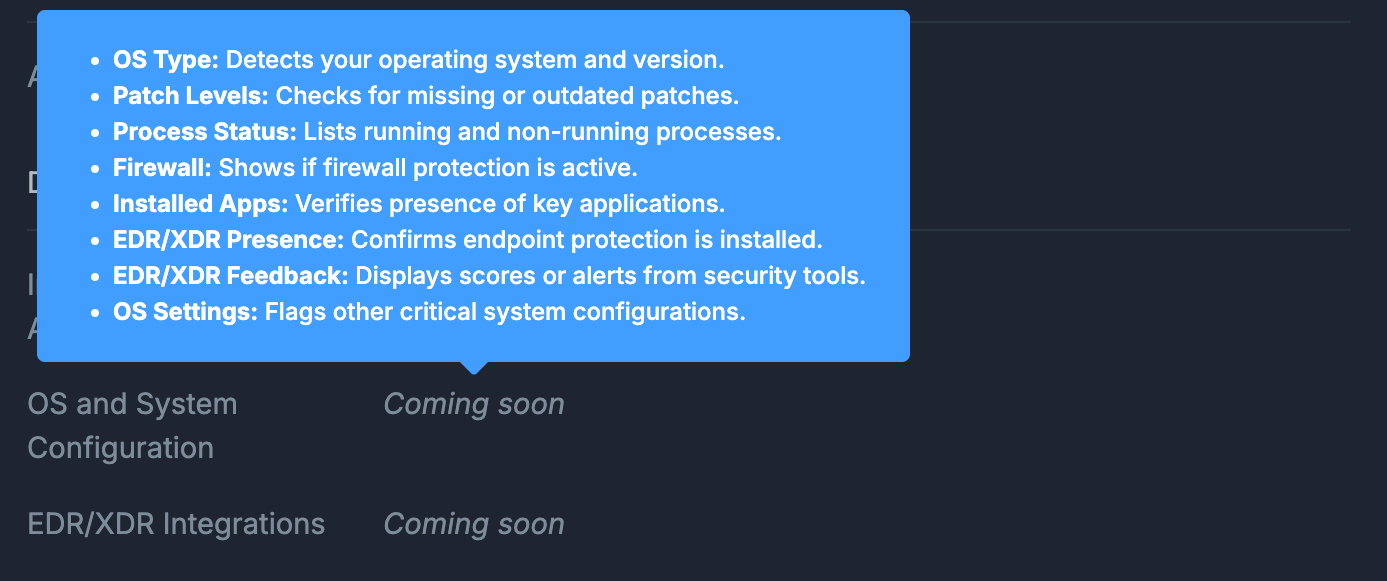
Figure 2. OS and System Configuration & EDR/XDR Integration Capabilities
These upcoming checks will enable Zenarmor to evaluate a broad range of device health indicators, including operating system configuration, patch status, application and process visibility, and EDR operational state.
Together, these enhancements will significantly expand device-level insight and strengthen Zero Trust enforcement across your environment.
For a detailed walkthrough on how these posture checks are defined and applied within policy rules, continue to the Defining Device Posture Checks section.